What is open?
An IP range is scanned, ports are listed, and sometimes service banners are shown. The output stays technical and prioritization is often left to the user.
- Host and port list
- Limited service context
- Manual interpretation required
Board-ready: security score + critical risk chain
Evidence: IP, service, asset family, audit record
Coverage: internal network + external surface + M365
Outcome: what is risky, why it matters, how to fix it
Basic network scanners mostly produce host, port, and banner lists. AfnRiskScan combines that signal with authenticated audits, external surface review, Microsoft 365 checks, passive controls, evidence bundles, AI interpretation, and verifiable action planning.
An IP range is scanned, ports are listed, and sometimes service banners are shown. The output stays technical and prioritization is often left to the user.
Asset family, service, authenticated audit result, passive security signal, external exposure, and customer profile are connected in the same risk record.
The AI and reporting layer is structured to produce executive summaries, attack scenarios, prioritized actions, command/click paths, and verification methods.
AfnRiskScan does not stop at raw port lists or isolated vulnerability output. It produces evidence, context, priority, and action inside an authorized assessment scope.
Sample findings ship in production reports with platform-specific commands, CLI steps, or Entra click-paths. Expand a card to see an example fix.
# Post Entra / AD audit example
Get-MgUser -All | Where-Object { $_.StrongAuthenticationMethods.Count -eq 0 }
After MFA enforcement, the list should be empty or limited to approved exceptions.config system admin
edit admin
set trusthost1 10.0.0.0/8
next
endGUI/SSH access should only be possible from defined subnets.# Validate repository immutability and copy jobs
Get-VBRBackupRepository | Select Name, IsImmutabilityEnabledCritical jobs should show immutability and a secondary copy enabled.The site now mirrors the actual product architecture: AfnRiskScan discovers assets, gathers evidence, creates risk context, and converts technical output into decision-ready reporting.
Builds an asset map with ICMP, TCP fallback, AD seeds, MAC vendor lookup, and service classification.
Runs approved checks across AD, Windows, SQL, firewall, hypervisor, backup, and storage layers.
Combines DNS, subdomain, web header, TLS, mail posture, and internet port visibility.
Measures SMBv1, RDP NLA, default credentials, banner-to-CVE, and exposure signals without exploit attempts.
Turns findings into reportable packages with IP, device, proof, severity, and business context.
Delivers technical reports, HTML presentation reports, PDF, CSV/Excel, and historical scan outputs.
Module coverage is aligned with the current README and device risk catalog.
Kerberoasting, AS-REP, delegation, stale accounts, local admins, macro policy, Graph API, and Conditional Access checks.
FortiGate, Palo Alto, MikroTik, and generic firewall audits expose management-plane and policy risk.
Hypervisor and backup checks cover lockdown, snapshots, syslog, encryption, immutability, and backup freshness.
Synology, QNAP, switch SSH, printer, IP camera, SIP, and test/dev exposure checks reveal forgotten surfaces.
SQL authenticated audit and passive exposure review mixed mode, sa, xp_cmdshell, TLS, and privilege mapping.
Email security, DNS health, TLS certificates, web headers, cookies, and subdomains are tied to business impact.
AfnRiskScan outputs are not marketing-only mockups. These visuals are taken from real report, presentation, and console outputs.
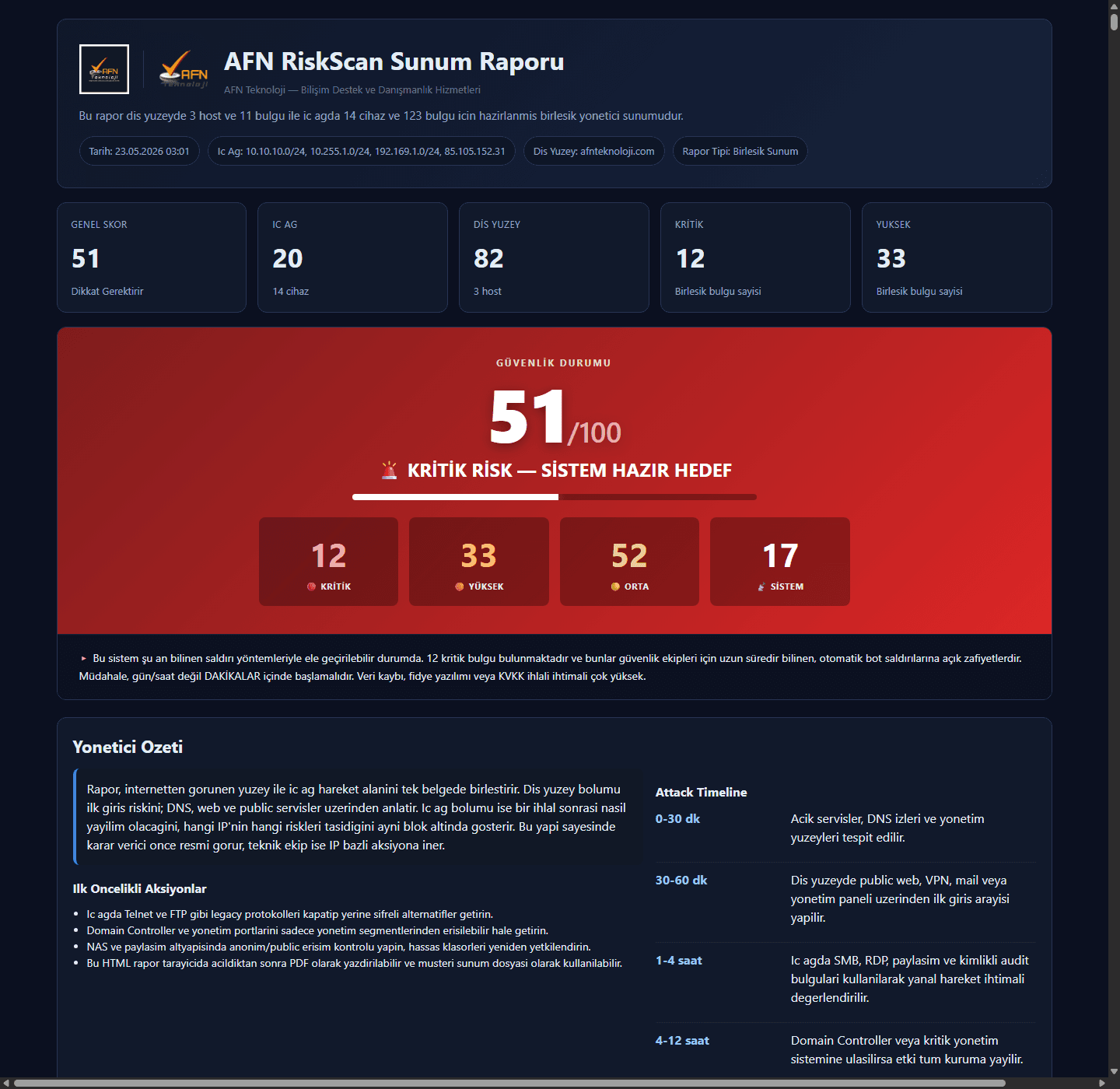
Executive summary, security score, attack timeline, and first actions.
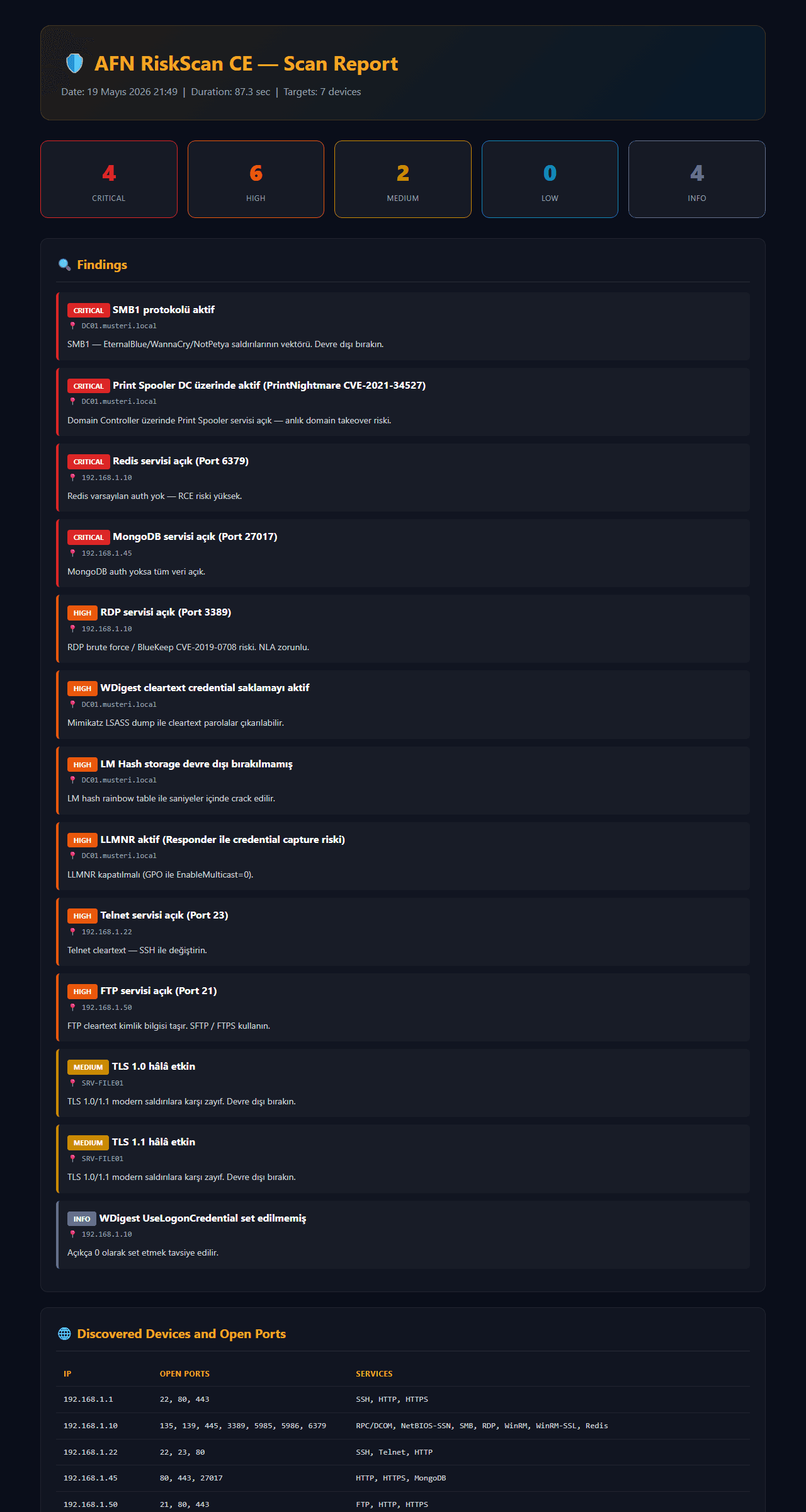
Severity cards, findings, affected assets, and open ports.
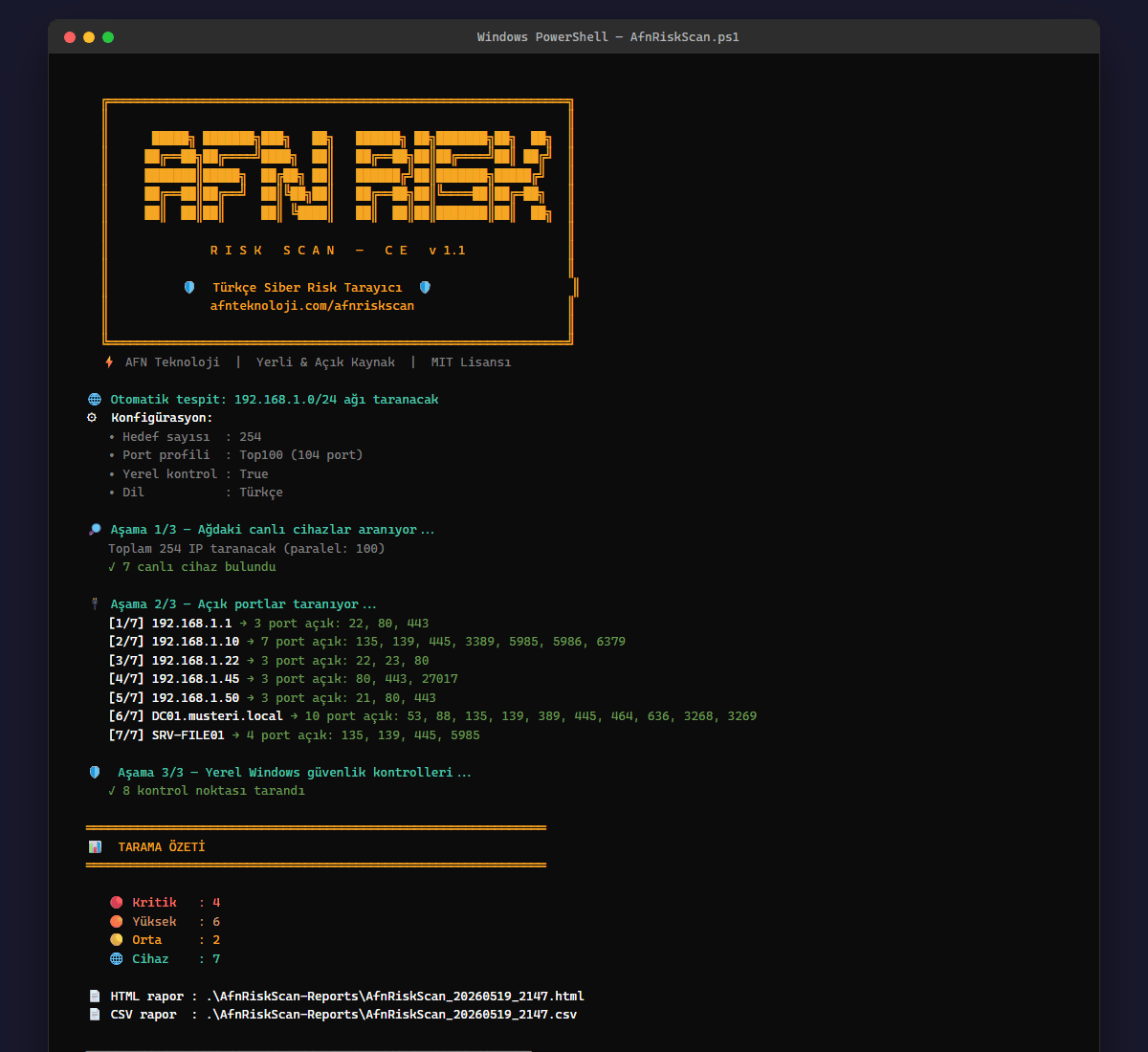
Operational output from scanning and report generation flow.
This list is derived from the current audit, passive security, external surface, Microsoft 365, and reporting capabilities. We do not show controls or references that are not present in the product.
The first product journey for IT teams is simple: define scope, run the assessment, let AI interpret the evidence, and share the report.
Define IP/CIDR, domain, external surface, AD/M365/firewall/backup scope, and customer profile.
Discovery, authenticated audits, and passive checks run within the authorized scope.
Evidence bundles are converted into business impact and action through structured output rules.
HTML presentation, technical report, PDF, and CSV/Excel outputs are shared.
Community Edition is the free edition published for quick preliminary assessment on networks you are authorized to test. It does not replace the Pro platform; it helps IT teams experience the AfnRiskScan approach, report format, and baseline risk visibility quickly.
pwsh -ExecutionPolicy Bypass -File .\AfnRiskScan.ps1Use only on systems where you have explicit authorization. CE generates HTML and CSV reports; Pro demo is recommended for enterprise deep assessment.
AfnRiskScan answers the same question across different organizations: which evidence-backed risks exist on my critical assets, and what should I fix first?
Fast scoping, repeatable reports, and executive-ready output across multiple customers.
Firewall, industrial protocol, camera, switch, and backup risks in one view.
MFA, privileged identity, logging, external surface, and data-risk prioritization.
Legacy Windows, broad shares, NAS, printer, and segmented network risk visibility.
External surface, email security, AD, and backup posture across distributed locations.
Standardized risk language across different companies and network segments.
These pages are designed for real search intent without making the main navigation crowded.
AfnRiskScan supports Claude, OpenAI Direct, and OpenAI Backend modes. On the backend path, the API key is not held by the desktop client; the WPF application sends the system prompt and evidence-bundle prompt to the configured backend URL. The backend requests strict JSON schema output through the OpenAI Responses API.
The environment has 42 assets, 6 critical findings, and 14 high findings. The most urgent chain is internet-reachable firewall administration, privileged identity MFA gaps, and a broadly accessible finance share.
AfnRiskScan reports are designed as decision files rather than scan dumps. Technical teams see exactly what to fix while leadership can read the risk chain, business impact, and priority order in the same assessment.
Critical risk chains, attack scenarios, business impact, and what-if-ignored outcomes are presented in clear management language.
Each finding can be tied to asset, port/service, audit record, proof, severity, recommended action, and verification method.
Presentation-oriented HTML, shareable PDF, and table-based CSV/Excel outputs for operations teams can be generated from the same assessment.
Scan history and trend outputs help track whether risk decreases over time and which control families improve.
The image below is captured from a real HTML presentation report generated by AfnRiskScan. The sample report combines internal network, external surface, security score, executive summary, attack timeline, priority actions, and asset-level findings in one presentation file.
The product separates authorized scope, customer profile, platform accounts, and AI backend settings. The report therefore shows not only findings, but also where evidence is strong and where coverage is missing.
IP/CIDR, domain, external surface, and platforms to audit are defined explicitly.
Industry, critical assets, and business context are used for AI prioritization.
Authenticated audits run only on authorized platforms with approved accounts.
The backend URL setting routes analysis to the service; model and API key are managed in backend configuration.
Evidence that cannot be collected or is out of scope is reflected as missing evidence in the report.
AfnRiskScan is structured to produce evidence at every step from discovery to reporting. The output is not only a scan result, but a verifiable risk file.
IP/CIDR, AD seeds, TCP fallback, service, and device-family visibility.
Approved audits for AD, Windows, SQL, firewall, M365, VMware, Veeam, and NAS.
SMBv1, RDP NLA, TLS, DNS, mail, camera, container, and exposure signals.
Findings, assets, proof, customer profile, coverage gaps, and business context are merged.
Strict JSON, attack timeline, businessImpact, priorityActions, and missingEvidence outputs.
Executive summary, technical evidence, remediation plan, PDF/HTML/CSV, and trend output.
The product flow is aligned with the current architecture documented in the application repository.
Assets are found through IP/CIDR scope, AD seeds, and customer profiles.
Port, service, banner, vendor, and profile signals identify device families.
Authenticated and passive modules run within the approved scope.
Findings are combined with evidence and severity in the rule-based risk engine.
Executive summaries, technical reports, HTML/PDF/CSV, and trend outputs are generated.
AFN Teknoloji brings enterprise infrastructure, security, backup, Microsoft ecosystem, and consulting experience into AfnRiskScan. The goal is to make technical findings understandable, evidence-based, and action-oriented.
Request a demo and see which modules create value for your network, firewall, AD, M365, and backup layers.
Request Free DemoKey questions IT teams ask before a demo or purchase.
No. It must be used only on explicitly authorized enterprise systems and approved scope.
The evidence bundle can include customer profile, findings, audit records, internal/external surface results, and coverage gaps.
In backend mode, the API key is not held by the WPF client; analysis runs through the configured backend URL.
Yes. The HTML presentation report can be opened in a browser and printed to PDF; technical and table outputs are also supported.
Authenticated audits are planned to run only on authorized platforms with approved accounts.
CE provides baseline discovery, port scanning, 8 Windows checks, and HTML/CSV reports. Pro adds enterprise deep assessment across AD, M365, firewall, Veeam, VMware, NAS, 68+ controls, and AI-assisted executive reporting.
Authorized findings, evidence, customer profile, and coverage gaps can be sent. Prompt rules ask the model not to invent CVEs without evidence and to state missing scope explicitly.
Discovery and some local assessment workflows can be reviewed without internet. M365, external surface, fresh CVE/AI, and email delivery flows may require connectivity or a backend.
For AfnRiskScan demos, deployment, licensing, or reporting questions, contact the AFN Teknoloji team.
CompanyAFN Teknoloji Bilişim Destek ve Danışmanlık Hizmetleri Tic. Ltd. Şti.
AddressZümrütevler Mah. Hanımeli Cad. Tuna İş Merkezi No:13 K:3 D:6 Maltepe / İstanbul 34852
Phone+90 216 572 50 40
Emailsatis@afnteknoloji.com
Webafnteknoloji.com / zafiyettarama.com.tr